Your WattTrim Portal Dashboard: Every Card Explained

Your WattTrim Sentinel Portal puts your electricity data, plan details, and savings picture in one place. The dashboard is accessible at gridwiseaudit.com/portal, where you can check what you are paying, see how your home uses energy, and spot opportunities before your next renewal.
Cards are reorderable. Drag and drop cards to reorder them, or use the arrow buttons in each card menu as a fallback, so the information you check most often appears first. The dashboard becomes more useful as it collects Smart Meter Texas data and as you add actual bills and plan history.
How to Read the Dashboard
The dashboard combines several kinds of information because no single number tells the whole story of an electricity plan. Smart Meter Texas supplies interval usage and production data, your profile supplies contract details, and uploaded bills supply the charges and credits that appear on statements. Together, these sources show both what happened and why it happened.
Some cards update on different schedules. Meter readings depend on the weekly data pull, while the Solar Sell Price card follows a live market feed and can change every five minutes. Estimated figures are useful for a timely view, but uploading a bill replaces an estimate with the amount your provider actually charged. If a number looks unexpected, check the last pull date, your profile settings, and the relevant bill before drawing a conclusion.
The dashboard also separates imported energy from exported solar energy. Imported kWh represent electricity supplied by the grid, while exported kWh represent energy sent back to the grid for a credit under your plan terms. Keeping those flows distinct makes it easier to understand a solar plan, compare export compensation with wholesale prices, and see whether a rate change affected the energy you buy, the energy you sell, or both.
Start Here: Your Account and Live Monitoring
Welcome Card
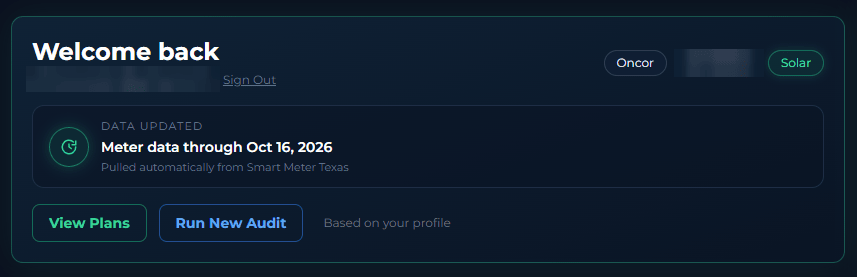
The Welcome Card is your home base. It shows the subscriber email, TDU service area, ZIP code, and a Solar badge when solar information is on your profile, along with buttons to View Plans and Run New Audit. The View Plans button is a shortcut to Profile View, where plans are ranked by your personalized savings based on actual Smart Meter data. This quick summary confirms that the portal is using the right account and service location before you review rates or savings.
Smart Meter Monitoring
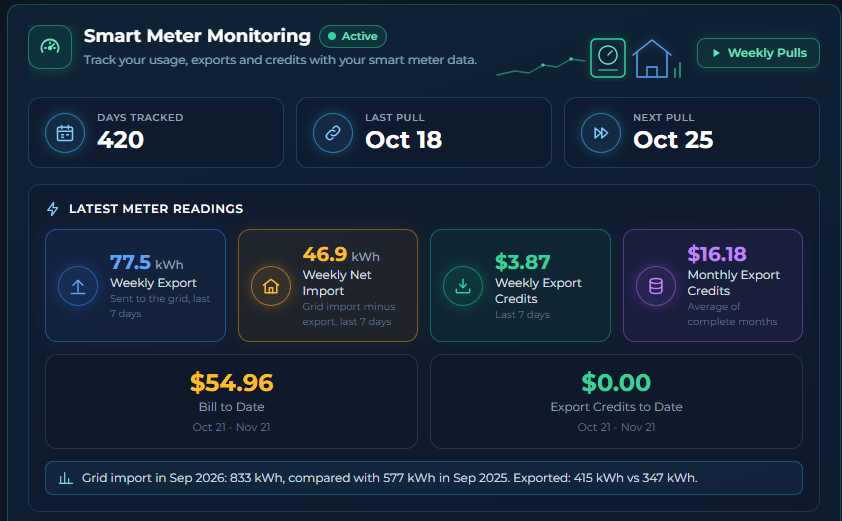
Smart Meter Monitoring shows how many days have been tracked, the dates of the last and next data pulls, and live meter readings. Those readings include weekly generation, net consumption, weekly export credits, average monthly export credits, bill to date, and export credits to date. Automatic weekly pulls from Smart Meter Texas replace guesswork with your actual usage, helping recommendations and savings calculations reflect how your home really operates.
Smart Insights
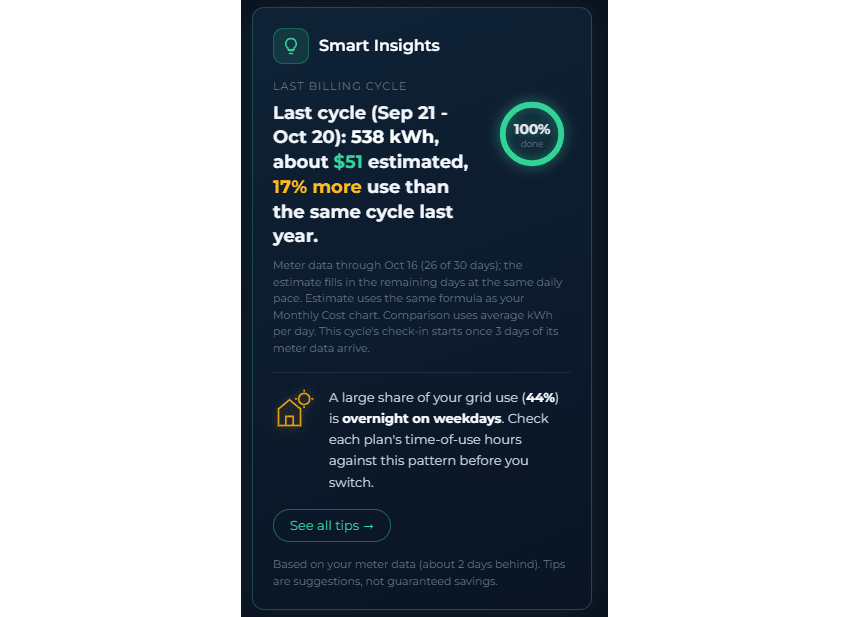
Smart Insights is a sidebar card that checks in on your billing cycle. Once 3 days of meter data arrive for the current cycle, it shows the day of the cycle (Day X of Y) and an On track or Running higher label. Until then, it recaps your last completed cycle: the kWh you used, an estimated bill using the same formula as the Monthly Cost Comparison chart, and the percent change in usage compared with the same cycle last year.
Below the cycle check-in, the card shows one tip based on your usage pattern. Select See all tips to list one fact-based tip for each pattern in your meter data: overnight use, weekend use, and weekday daytime use. Meter data runs about 2 days behind. Tips are suggestions, not guaranteed savings.
Rates, Solar, and Usage Patterns
Rate Trends
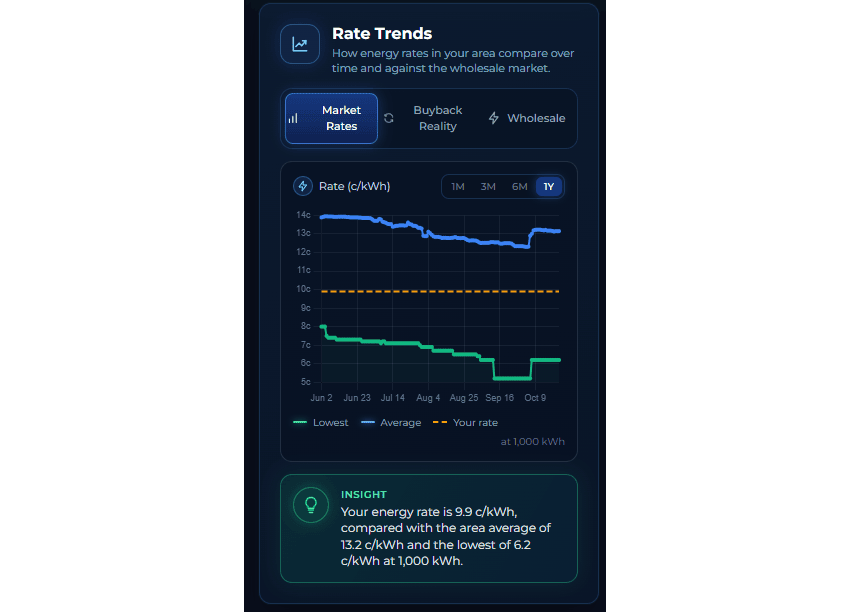
Rate Trends is a sidebar card with three tabs: Market Rates, Buyback Reality, and Wholesale. Market Rates helps you compare current offers with your locked-in rate, while Buyback Reality compares advertised solar buyback rates with actual ERCOT wholesale prices. The Wholesale tab adds market context, so you can tell whether a plan looks competitive because of a real advantage or simply because of marketing language.
Solar Sell Price
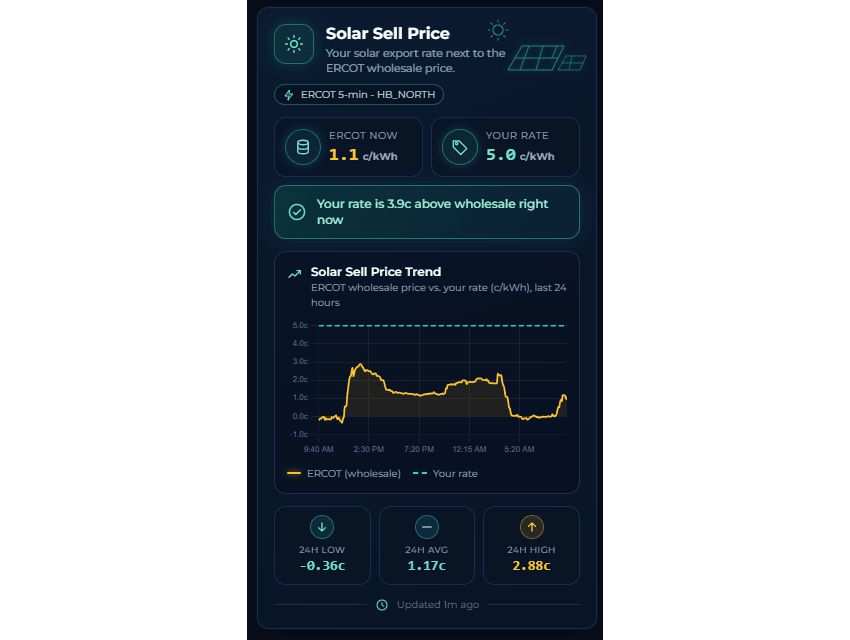
Solar Sell Price is a sidebar card for solar customers. It compares the real-time ERCOT wholesale price with your contracted export rate, updating every five minutes. Seeing how far your fixed rate sits above or below wholesale right now helps you understand the value of your export terms instead of judging them from the headline rate alone.
Usage Trend
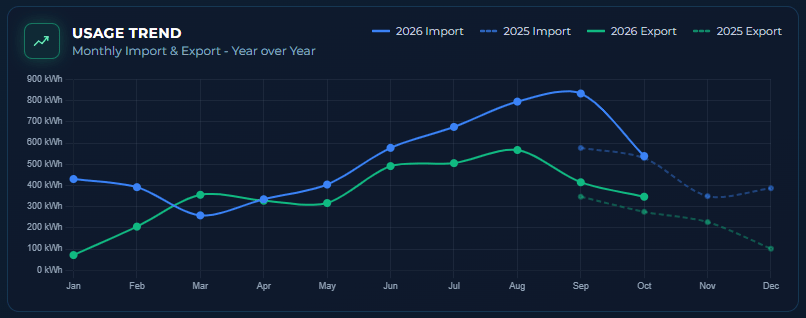
Usage Trend charts monthly imports and exports year over year, comparing 2025 with 2026. Seasonal patterns become easier to see, and you can tell whether consumption is growing, shrinking, or staying consistent compared with the same months last year. That context helps separate a plan problem from a change in weather, household routine, or solar production.
Export Credit Comparison
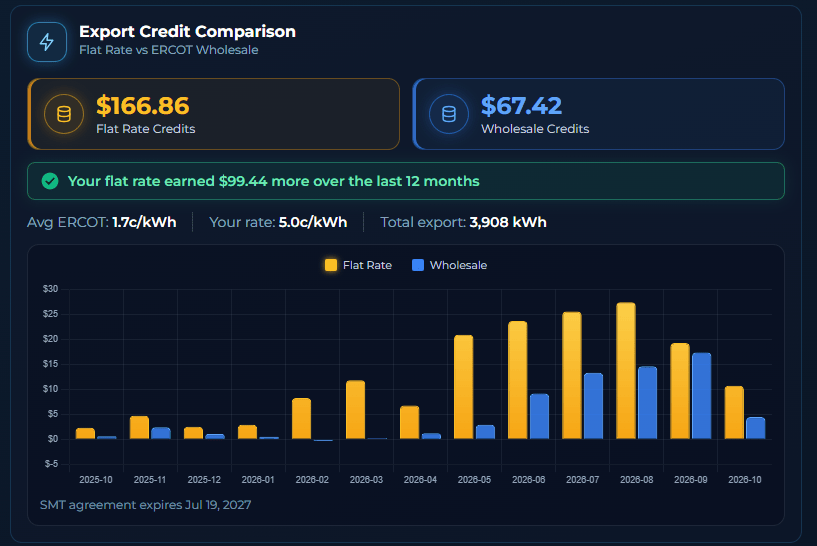
Export Credit Comparison is for solar customers. It compares flat-rate export credits with what you would have earned at ERCOT wholesale prices during the last 12 months, using a month-by-month bar chart and a rolling total. It answers a practical question: is your fixed buyback rate actually a good deal for the energy you send to the grid?
Plan Recommendations and Contract Timing
Your Top Plans

Your Top Plans checks your current plan against available plans using your actual weekly Smart Meter data, not generic estimates. The full plan list now lives in the Plan Performance card below. When a plan would save you money, Your Top Plans shows a "See better plans" button; otherwise it shows "Already One of the Best". Because the comparison uses your usage pattern, you can evaluate likely annual cost and savings with more confidence before switching.
Savings projections include early termination fee adjustments when an ETF is recorded in your Provider Status card. If switching to a recommended plan means paying a cancellation fee on your current contract, that cost is factored into the projected savings so you can see the net benefit after accounting for any exit costs.
Plan Performance
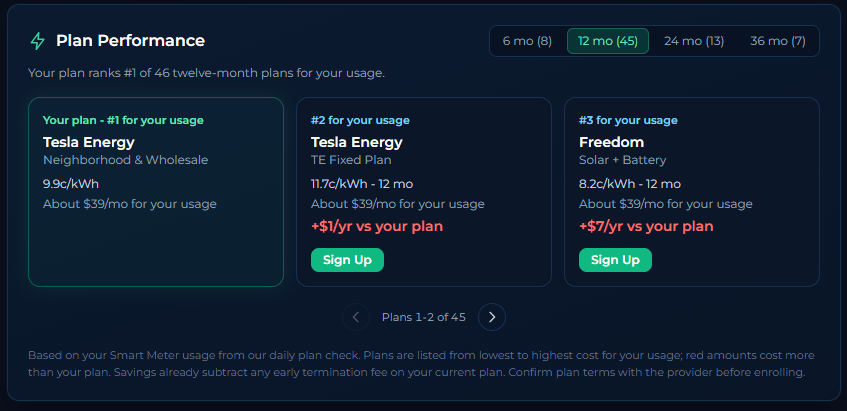
The Plan Performance card shows how your current plan stacks up against every plan we compared using your actual usage.
- Your plan comes first, with its estimated yearly cost based on your smart meter data.
- Other plans follow from lowest to highest cost. Plans that would cost more than yours show the difference in red, so you can see why your current plan holds up.
- The rank line tells you where your plan places, such as "ranks #1 of 42."
- Term tabs (6, 12, 24 and 36 months) let you compare plans of the same contract length.
- Use the slider to scroll through more plans.
Costs are estimates based on your past usage. Confirm prices with the provider before enrolling.
Provider Status
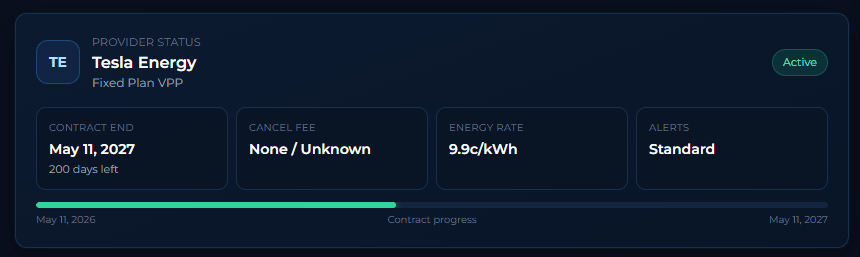
Provider Status shows your current provider, plan type, contract end date, days remaining, cancellation fee, and energy rate, with a bar tracking contract progress. Keeping this information visible means you can prepare for renewal instead of drifting into a potentially expensive month-to-month or automatic renewal rate. The recorded ETF is also used by Top Plans recommendations and Profile View rankings to calculate net savings after any cancellation costs. Check it before shopping, particularly when the countdown gets close to zero.
The Cost of Your Electricity
Effective Rate Tracker
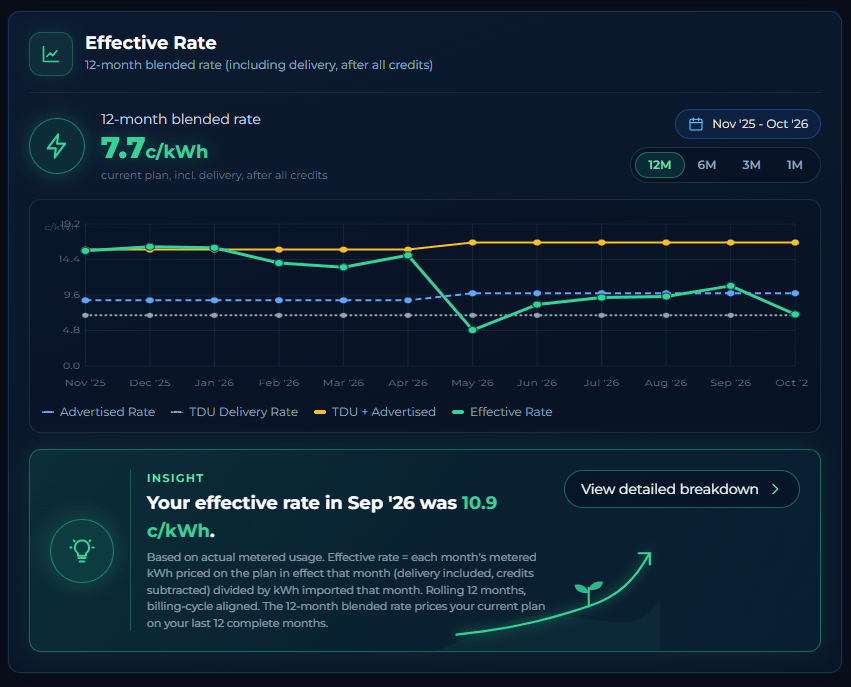
The Effective Rate Tracker follows four lines over a rolling 12 months. The blue dashed line is your advertised energy-only rate from your plan history. The gray dotted line is the TDU delivery rate. The amber solid line combines TDU and advertised into a single baseline, showing what you would pay per kWh before any credits. The emerald solid line is your effective rate, based on actual metered usage. Each month's metered kWh is priced on the plan in effect that month, with delivery charges and fees included and export credits, VPP credits, and bill credits subtracted, then divided by the kWh you imported.
The gap between the amber baseline and the emerald effective rate represents how much your solar exports and VPP credits reduce your real per-kWh cost. When you change plans, step changes in the advertised-rate and baseline lines make the timing and financial effect of that switch easy to see. Solar customers will typically see the emerald line dip well below the baseline during high-production months.
Here is an example of a contract change shown on the card. The card pictured above belongs to a solar customer who switched plans in May 2026. From November through April, the customer was on a Champion plan that paid a wholesale buyback rate for solar exports, so the emerald effective rate stayed close to the amber baseline.
In May, the customer moved to a Tesla VPP plan with a guaranteed 5 cent per kWh buyback rate and a monthly VPP credit for the home battery. The blue advertised rate and the amber baseline step up slightly that month, but the emerald effective rate drops well below the baseline because the higher buyback rate and the VPP credit are subtracted from each month's cost.
Through the summer, the effective rate rises as more kWh are imported from the grid and the fixed monthly credit is spread across more usage, but the effective rate stays well below the TDU + Advertised rate.
The takeaway: a higher advertised rate does not always mean a higher real cost. The credits a plan pays can matter just as much.
At the top of the card, the 12-month blended rate gives you one all-in number for your current plan. It takes your last 12 complete billing months, prices that usage on the plan you have today, including TDU delivery charges, and subtracts every credit the plan pays: solar export credits, battery (VPP) credits, and bill credits in the months your usage reaches the credit level. That total is divided by the kWh you imported from the grid. The current partial month is left out so a few days of data cannot skew the result.
Because it is a single per-kWh figure that already includes delivery and credits, the blended rate is the easiest way to compare your current plan with the effective rates shown on plan cards in Profile View. It may differ slightly from the rate in your audit results, which is based on the 12 months included in that audit.
Monthly Cost Comparison
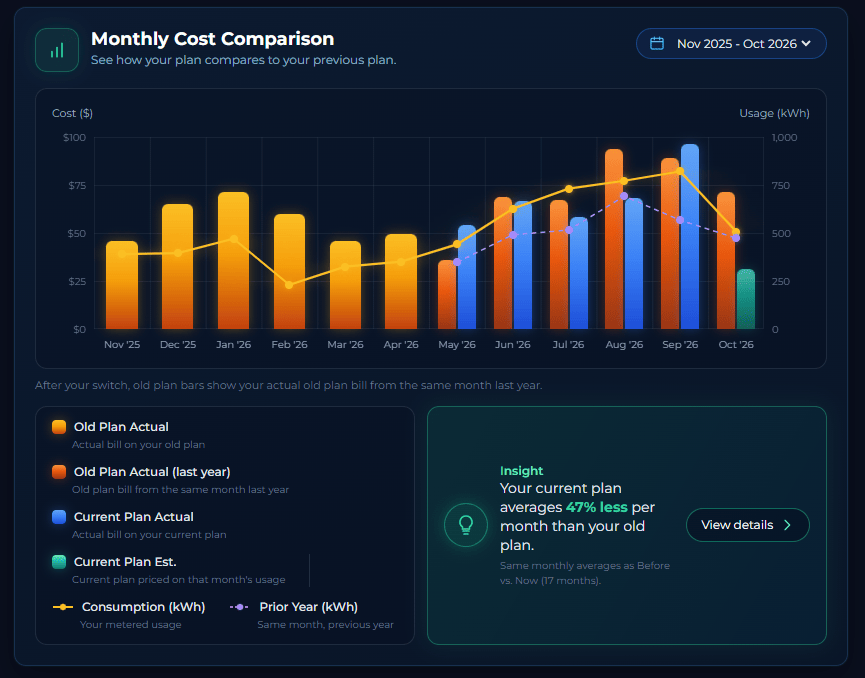
Monthly Cost Comparison uses color-coded bars to show old-plan cost versus current-plan cost for each month. Old Plan Actual bills appear in amber, and after your switch, orange bars show your actual old plan bill from the same month last year. Current Plan Actual bills appear in blue, and Current Plan Estimated costs, priced on that month's usage, appear in teal. A yellow consumption line and a dashed purple prior-year line add usage context to each month. An Insight panel summarizes how much less (or more) your current plan averages per month than your old plan. This separation of estimated and actual costs is the visual proof of whether switching plans saved real money or increased costs after usage and seasonal conditions are taken into account.
In the chart above, notice that the current plan (blue bars) costs less per month than the old plan (orange bars) even during months when consumption was higher than the prior year. That is exactly the kind of insight the dashboard is built to surface: lower costs are not always the result of using less electricity, and the right plan can save money even when usage goes up.
Energy Balance
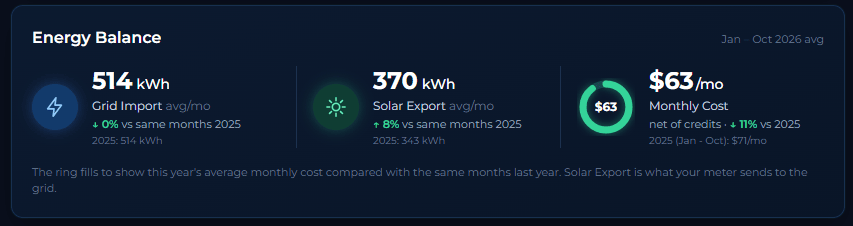
Energy Balance provides three donut charts for average monthly cost, grid import in kWh, and solar export in kWh. Each includes a year-over-year percentage change for a quick health check of your energy profile. A glance can reveal whether a cost change came with more consumption, less solar export, or a meaningful improvement in your overall balance.
Before vs Now
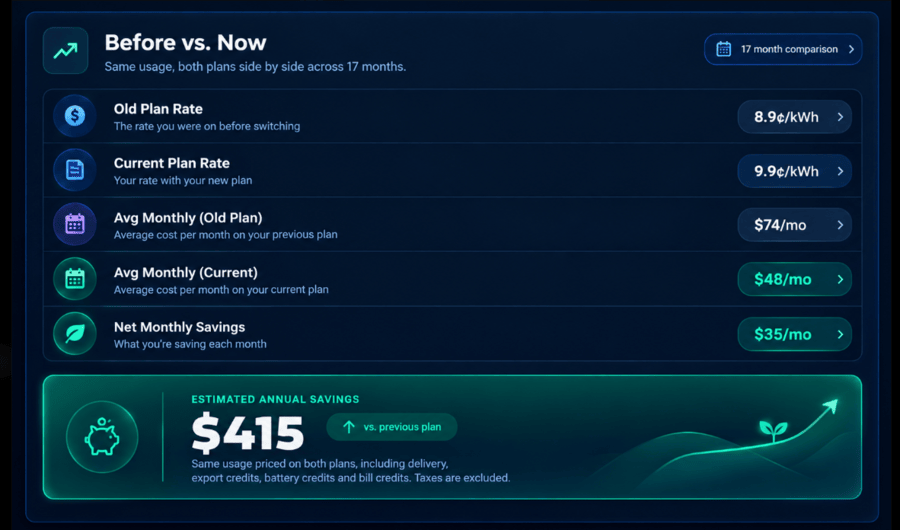
Before vs Now gives a side-by-side comparison of your old plan rate and current plan rate, average monthly cost for each, net monthly savings, and estimated annual savings. It is the bottom-line answer to whether switching was worth it. Use it alongside your actual bills and the Effective Rate Tracker to understand both the headline change and the total cost after fees and credits.
Find Savings in Your Daily Habits
Time of Use Breakdown
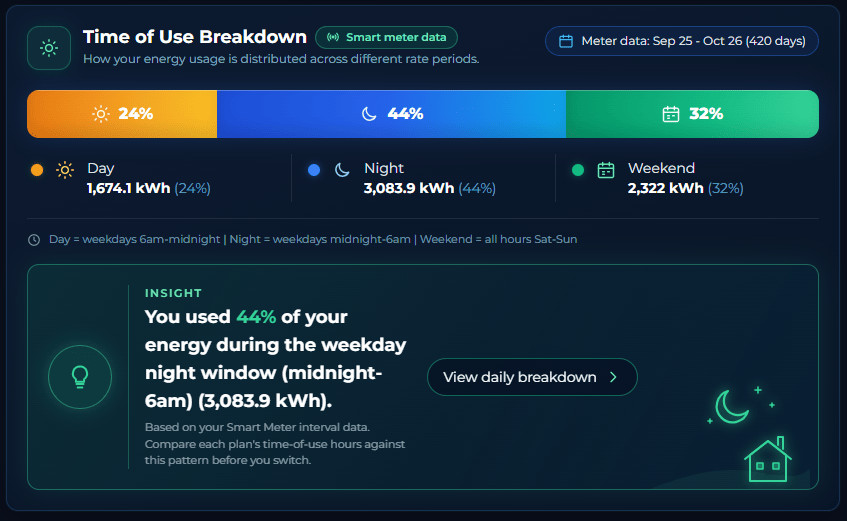
Time of Use Breakdown displays a horizontal stacked bar for Day, Night, and Weekend usage, with kWh totals for each period. It shows when you actually consume electricity, rather than assuming a typical household schedule. That information can help identify whether a time-of-use plan might save money, or whether its discounted periods do not match your routine.
Bill Credit Analysis
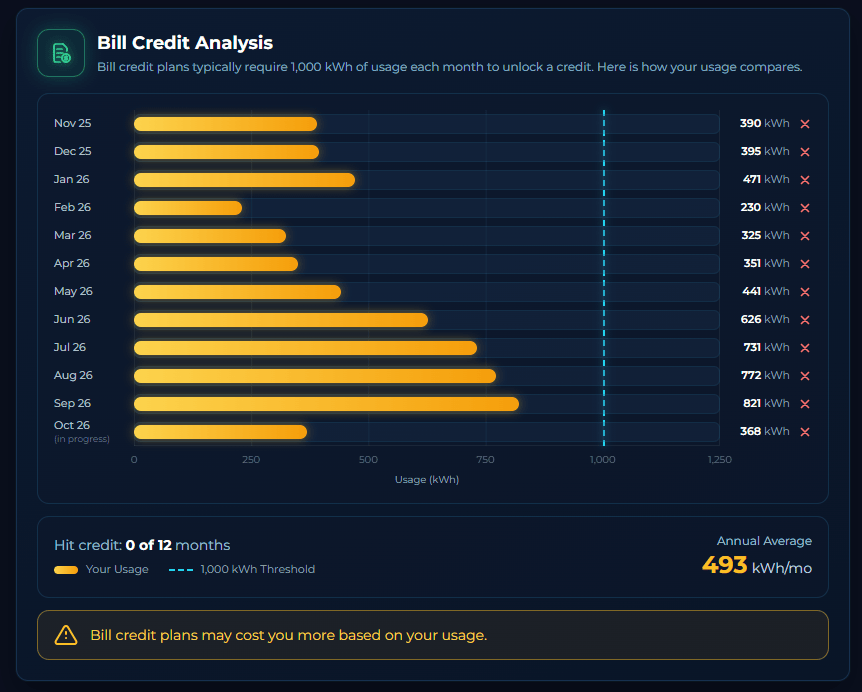
Bill Credit Analysis shows whether your monthly usage consistently reaches the threshold where bill credit plans unlock their discount, typically 1,000 kWh. A horizontal bar chart plots each of the last 12 months against that threshold, with green bars and a check mark for months that hit the credit and amber bars with an X for months that fell short. A running count at the bottom shows how many months qualified out of twelve.
The card shows your Annual Average as a number: your typical monthly usage across the months shown. Months well above that figure are your heavier months, and months below it are your lighter ones.
That average is a practical shopping target. Every Electricity Facts Label lists prices at 500, 1,000, and 2,000 kWh, so compare plans at the usage level closest to your own average instead of relying on the 1,000 kWh price most listings advertise. The spread around that average matters too: if your usage swings well above and below average through the year, a plan with a steady rate at every usage level usually holds up better than one that depends on landing in a narrow credit window. Why tiered pricing is tricky explains how those usage tiers work.
If you hit the credit threshold most months, a bill credit plan may work well for your household. If you regularly fall short, those plans can quietly cost more than a straightforward flat-rate option because the higher base rate applies without the offsetting credit. The card helps you evaluate whether a bill credit structure genuinely fits your usage pattern before committing to one.
Daily Energy Breakdown
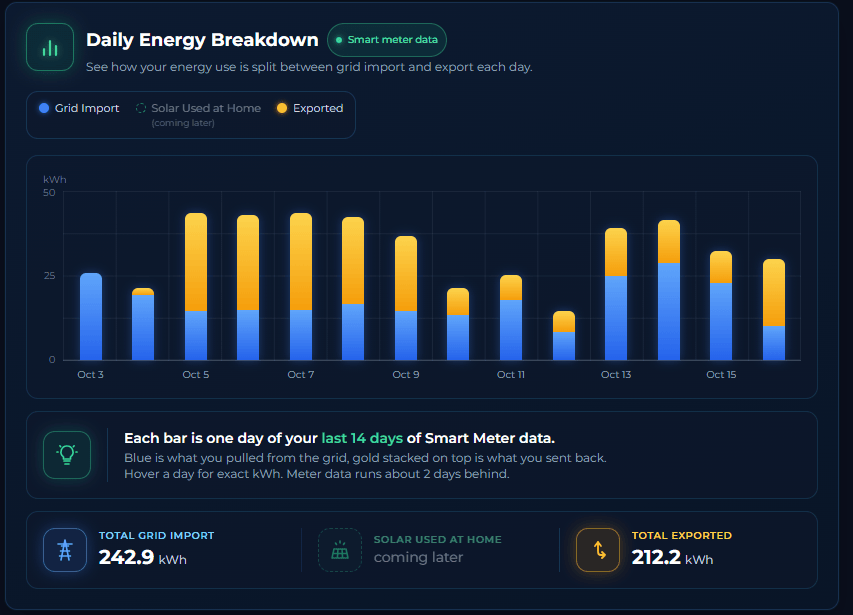
Daily Energy Breakdown shows how your energy use is split between grid import and export each day. Each bar is one day of your last 14 days of Smart Meter data: blue is what you pulled from the grid, and gold stacked on top is what you sent back. Hover a day for exact kWh, and totals for grid import and exported energy appear below the chart. Meter data runs about 2 days behind. Reviewing the pattern can connect a high bill with a specific day, heat event, appliance, or change in household activity.
Keep Your Profile and History Accurate
Edit Profile

Edit Profile is an expandable section for updating your rate, export rate, VPP credit, billing cycle day, and other profile settings. Accurate inputs keep the dashboard's comparisons, estimates, and solar calculations aligned with your contract. Update the profile whenever a provider changes a term or you move to a new plan.
Monthly Bills
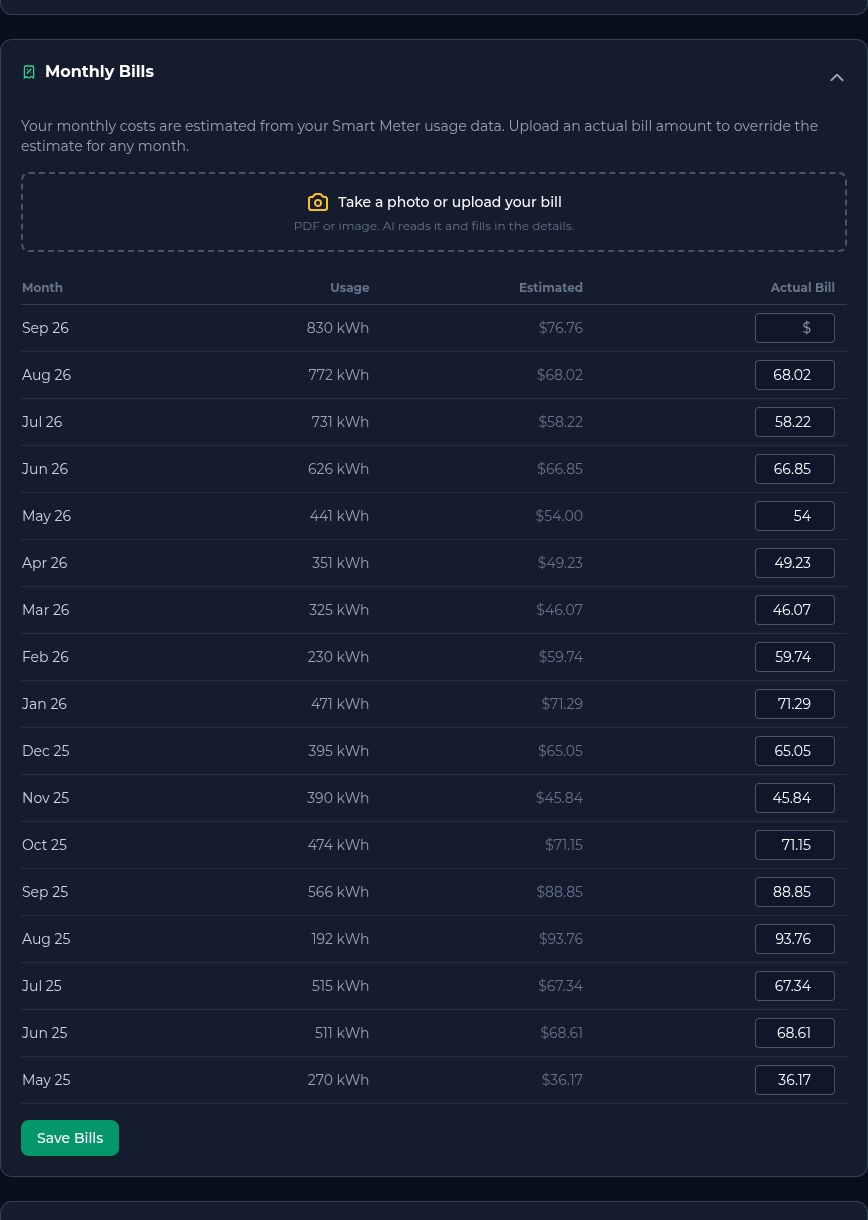
Monthly Bills is an expandable table of your billing data. Uploading actual bills overrides estimates and improves the accuracy of dashboard calculations, including costs, credits, and plan comparisons. Actual statements are especially useful when a bill includes a fee, credit, or adjustment that meter data alone cannot identify.
Plan History
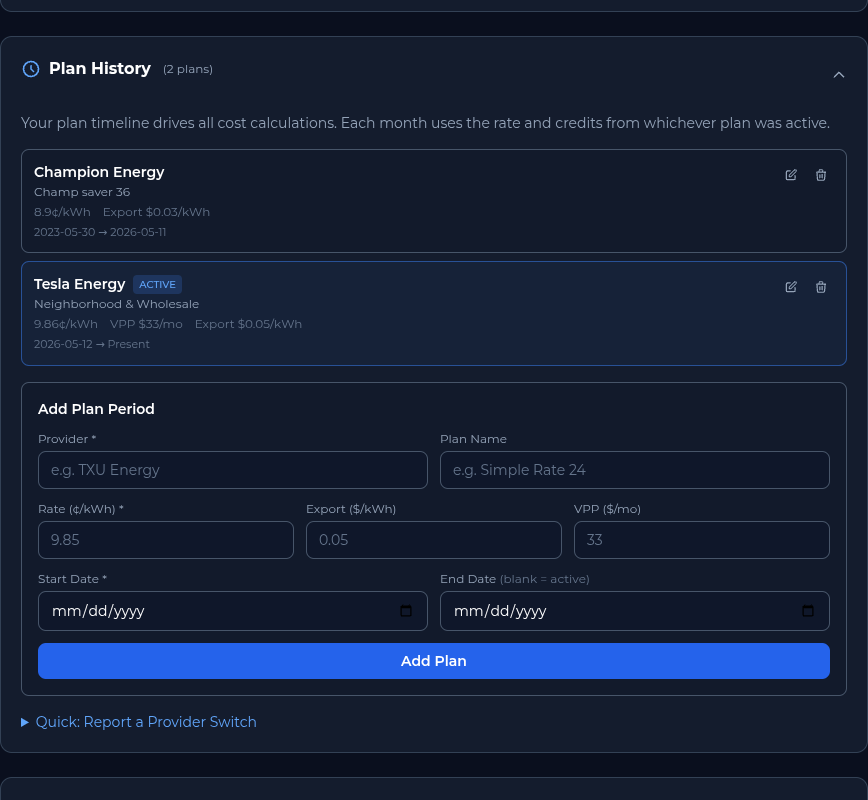
Plan History is an expandable timeline of your electricity plans, including start dates and rates. It gives the dashboard a reliable record of which rate applied during each period and feeds the Effective Rate Tracker with historical plan data. Keeping every switch in the timeline makes long-term savings comparisons more meaningful.
What Sentinel Includes
Your Sentinel Benefits
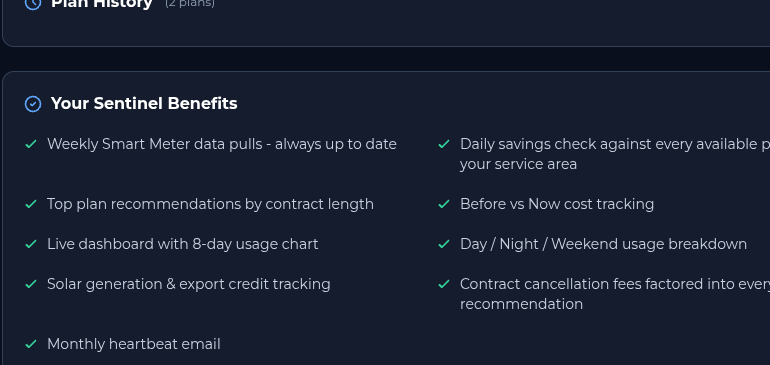
Your Sentinel Benefits is a checklist of what is included with the $4.99 per month Sentinel subscription. It covers weekly data pulls, daily savings checks, top plan recommendations, Before vs Now tracking, the Time of Use Breakdown, solar and export tracking, cancellation-fee math, and a monthly heartbeat email. This card makes it easy to confirm that the monitoring and decision support you expect are part of your active service.
Earn Free Monitoring
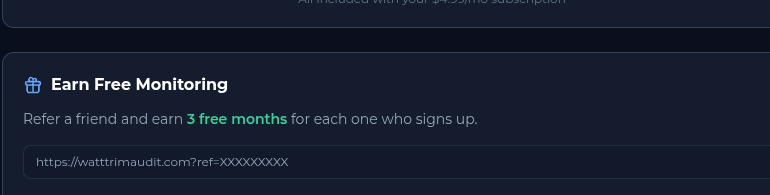
Earn Free Monitoring explains the referral program. Share your personal link, and you earn three free months of Sentinel for each friend who signs up. It is a simple way to extend your monitoring at no cost while helping someone else make a more informed electricity-plan choice.
A Simple Monthly Review
A short review once a month is enough to keep the dashboard useful. First, confirm that Smart Meter Monitoring has a recent pull and that the provider, contract end date, and plan rate in your profile are current. Next, compare the latest actual bill with Monthly Cost Comparison and look at Effective Rate Tracker for changes that may not be obvious from the advertised rate.
If your usage or cost moved, check Recent Daily Usage and Time of Use Breakdown for a pattern. Solar customers can also compare export credits with the wholesale reference and review the current Solar Sell Price. Finally, if renewal is approaching, open Your Top Plans and read each plan's Electricity Facts Label before taking action. This routine turns a large set of cards into a few practical checks: is the data current, is the bill behaving as expected, and is a better plan available?
Make the Dashboard Work for You
Start with the Welcome Card and Smart Meter Monitoring to confirm your account and data connection. Then review Provider Status, Rate Trends, and Your Top Plans before a contract ends, and use Monthly Bills and Plan History to keep the record dependable. Solar customers should pay close attention to Solar Sell Price and Export Credit Comparison, while every customer can use Effective Rate Tracker, Time of Use Breakdown, Bill Credit Analysis, and Recent Daily Usage to turn a monthly bill into an understandable pattern.
The portal is designed to support decisions, not replace your judgment. Plan terms can include fees, minimum usage rules, credits, and eligibility conditions, so read the Electricity Facts Label before enrolling. When you are ready to establish your baseline, Run Your Free Audit. Run your first audit for free to get started. The audit is used as a data starting point for the Dashboard and Profile View.
See How Much You Could Save
Upload a photo of your electricity bill and get personalized results within minutes.
Trim My BillAlways Free